Mastering JavaScript: Data Types

JavaScript is a versatile and widely-used programming language, essential for web development and beyond. A deep understanding of its data types and object handling is crucial for writing efficient and maintainable code. This comprehensive guide will cover JavaScript data types, focusing on primitive types, objects, and the powerful typeof operator.
JavaScript Data Types: Primitive Types
Primitive types in JavaScript are the most basic data types, immutable and foundational for building more complex structures. These include strings, numbers, booleans, undefined, bigint, null, and symbols. Let's explore each of these types in detail.
1. String
A string is a sequence of characters used to represent text. Strings are created by enclosing characters in single quotes (' '), double quotes (" "), or backticks (` ` ).
Examples:
let singleQuoteString = 'Hello, World!';
let doubleQuoteString = "Hello, JavaScript!";
let templateLiteralString = `Hello, ${singleQuoteString}`;
Key Points:
Concatenation: Strings can be concatenated using the
+operator or template literals.let greeting = 'Hello, ' + 'World!'; let name = 'Logan'; let personalizedGreeting = `Hello, ${name}!`;Escape Characters: Special characters can be escaped using the backslash (
\).let escapedString = 'He said, "It\'s a beautiful day!"';String Methods: Common string methods include
length,toUpperCase(),toLowerCase(),charAt(),substring(),split(),includes(),indexOf(),slice(),trim(), andreplace().let message = 'JavaScript'; console.log(message.length); // 10 console.log(message.toUpperCase()); // 'JAVASCRIPT' console.log(message.toLowerCase()); // 'javascript' console.log(message.charAt(0)); // 'J' console.log(message.substring(0, 4)); // 'Java' console.log(message.split('')); // ['J', 'a', 'v', 'a', 'S', 'c', 'r', 'i', 'p', 't'] console.log(message.includes('Script')); // true console.log(message.indexOf('S')); // 4 console.log(message.slice(0, 4)); // 'Java' console.log(message.trim()); // 'JavaScript' (if there are spaces) console.log(message.replace('Java', 'Type')); // 'TypeScript'
2. Number
The number type represents both integer and floating-point numbers.
Examples:
let integer = 42;
let floatingPoint = 3.14;
let negativeNumber = -7;
let exponential = 2.5e4; // 25000
Key Points:
Arithmetic Operations: Supports addition (
+), subtraction (-), multiplication (*), division (/), and modulus (%).let sum = 10 + 5; // 15 let difference = 10 - 5; // 5 let product = 10 * 5; // 50 let quotient = 10 / 5; // 2 let remainder = 10 % 3; // 1Special Numeric Values: Includes
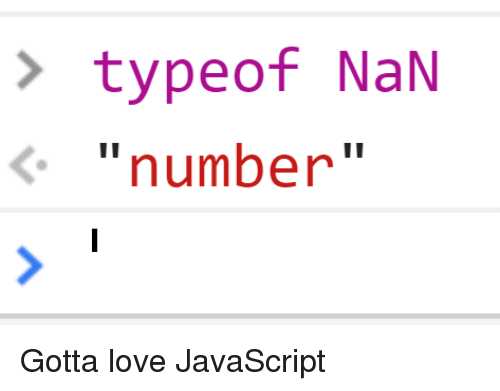
Infinity,-Infinity, andNaN(Not-a-Number).console.log(1 / 0); // Infinity console.log(-1 / 0); // -Infinity console.log(0 / 0); // NaNNumber Methods: Includes
toFixed(),toPrecision(),toString(),parseInt(), andparseFloat().let num = 123.456; console.log(num.toFixed(2)); // '123.46' console.log(num.toPrecision(4)); // '123.5' console.log(num.toString()); // '123.456' console.log(Number.parseInt('123')); // 123 console.log(Number.parseFloat('123.45')); // 123.45
3. Boolean
A boolean represents one of two values: true or false. Commonly used in conditional statements and comparisons.
Examples:
let isJavaScriptFun = true;
let isMathHard = false;
Key Points:
Logical Operations: Includes
&&(AND),||(OR), and!(NOT).let result = isJavaScriptFun && isMathHard; // false let alternative = isJavaScriptFun || isMathHard; // true let negation = !isJavaScriptFun; // falseComparison Operators: Includes
==,===,!=,!==,<,>,<=, and>=.console.log(5 > 3); // true console.log(5 === 5); // true console.log(5 !== 3); // true
4. Undefined
Indicates that a variable has been declared but not assigned a value.
Examples:
let unassignedVariable;
console.log(unassignedVariable); // undefined
Key Points:
Function Return Values: Functions that do not explicitly return a value return
undefined.function doNothing() {} console.log(doNothing()); // undefinedMissing Parameters: If a function is called with fewer arguments than defined, the missing parameters are
undefined.function greet(name) { console.log(`Hello, ${name}`); } greet(); // Hello, undefined
5. BigInt
Used for integers too large for the number type. Created by appending n to an integer literal or using the BigInt() constructor.
Examples:
let bigNumber = 1234567890123456789012345678901234567890n;
let anotherBigNumber = BigInt("1234567890123456789012345678901234567890");
Key Points:
Arithmetic Operations: Supports operations but cannot be mixed with
numberwithout conversion.let sum = bigNumber + 10n; let product = bigNumber * 2n;Comparison: BigInt values can be compared using the same operators as
number.console.log(bigNumber > anotherBigNumber); // false console.log(bigNumber === anotherBigNumber); // trueConversion: Convert to string with
toString()and vice versa usingBigInt().console.log(bigNumber.toString()); // '1234567890123456789012345678901234567890' let strBigInt = '1234567890123456789012345678901234567890'; console.log(BigInt(strBigInt)); // 1234567890123456789012345678901234567890n
6. Null
Represents the intentional absence of any object value. Often used to indicate that a variable should be empty.
Examples:
let emptyValue = null;
Key Points:
Type Checking: Using
typeofonnullreturns"object", a bug in JavaScript.console.log(typeof null); // 'object'Comparison:
nullis loosely equal toundefinedbut not to any other value.console.log(null == undefined); // true console.log(null === undefined); // false
7. Symbol
Used to create unique identifiers. Created using the Symbol() function.
Examples:
let symbol1 = Symbol();
let symbol2 = Symbol('description');
Key Points:
Uniqueness: Each
Symbolis unique, even if they have the same description.let symbolA = Symbol('unique'); let symbolB = Symbol('unique'); console.log(symbolA === symbolB); // falseUse in Objects: Often used as property keys in objects to ensure the keys are unique.
```javascript let obj = {
}; console.log(objsymbol1); // 'value1'
* **Global Symbols**: Symbols can be registered globally using `Symbol.for()` and retrieved using `Symbol.keyFor()`.

    ```javascript
    let globalSymbol = Symbol.for('shared');
    let anotherGlobalSymbol = Symbol.for('shared');
    console.log(globalSymbol === anotherGlobalSymbol); // true
    console.log(Symbol.keyFor(globalSymbol)); // 'shared'

JavaScript Data Types: Objects
Objects in JavaScript are collections of properties and methods. They are essential for organizing and structuring data and are integral to understanding prototypal inheritance and the object prototype.

Creating an Object
Object Literals
The most common way to create an object is using object literals.
let person = {
  name: 'Logan',
  age: 197,
  greet: function() {
    console.log(`Hello, my name is ${this.name}`);
  }
};
Using the Object Constructor
Another way to create an object is using the Object constructor.
let person = new Object();
person.name = 'Logan';
person.age = 197;
person.greet = function() {
  console.log(`Hello, my name is ${this.name}`);
};
Object Properties
Accessing Properties
Properties can be accessed using dot notation or bracket notation.
console.log(person.name); // 'Logan'
console.log(person['age']); // 197
Adding and Modifying Properties
Properties can be added or modified dynamically.
person.email = 'wolverine@xmen.com';
person.age = 200;
Deleting Properties
Properties can be deleted using the delete operator.
delete person.age;
Methods in Objects
Methods are functions stored as object properties.
let calculator = {
  add: function(a, b) {
    return a + b;
  },
  subtract: function(a, b) {
    return a - b;
  }
};

console.log(calculator.add(5, 3)); // 8
console.log(calculator.subtract(5, 3)); // 2
this Keyword
The this keyword refers to the current object in which the method is being executed.
let person = {
  name: 'Logan',
  greet: function() {
    console.log(`Hello, my name is ${this.name}`);
  }
};

person.greet(); // 'Hello, my name is Logan'
Object Prototypes
Objects in JavaScript are linked to prototypes, which are also objects. This link allows objects to inherit properties and methods from their prototypes, forming a prototype chain.
Prototypal Inheritance
When an object is created, it inherits properties and methods from its prototype. If a property or method is not found on the object itself, JavaScript looks for it on the object's prototype.
let animal = {
  speak: function() {
    console.log('Animal speaks');
  }
};

let dog = Object.create(animal);
dog.bark = function() {
  console.log('Dog barks');
};

dog.speak(); // 'Animal speaks'
dog.bark(); // 'Dog barks'
Object.getPrototypeOf()
This method returns the prototype of the specified object.
console.log(Object.getPrototypeOf(dog)); // { speak: [Function: speak] }
Object.setPrototypeOf()
This method sets the prototype of the specified object.
let cat = {
  meow: function() {
    console.log('Cat meows');
  }
};

Object.setPrototypeOf(cat, animal);
cat.speak(); // 'Animal speaks'
cat.meow(); // 'Cat meows'
JavaScript Data Types: The typeof Operator
What is the typeof Operator?
The typeof operator is used to return a string that indicates the type of an operand. The operand can be a variable, an object, a function, or any other expression. This operator is particularly useful for debugging and for writing code that can handle different types of data appropriately.
Syntax
The syntax for the typeof operator is straightforward:
typeof operand
Alternatively, you can use parentheses for clarity, although they are not required:
typeof (operand)
Return Values of the typeof Operator
The typeof operator can return one of several strings, each representing a different data type. Here are the possible return values:
"undefined": If the variable is not defined or has not been assigned a value.
"boolean": If the variable is a Boolean value (
trueorfalse)."number": If the variable is a number, including integers and floating-point numbers.
"bigint": If the variable is a BigInt value, used for arbitrarily large integers.
"string": If the variable is a string.
"symbol": If the variable is a Symbol, a unique and immutable data type introduced in ES6.
"object": If the variable is an object, including arrays,
null, and other objects."function": If the variable is a function.
Examples
Let's look at some examples to understand how the typeof operator works:
let a;
console.log(typeof a); // Output: "undefined"

a = true;
console.log(typeof a); // Output: "boolean"

a = 42;
console.log(typeof a); // Output: "number"

a = 42n;
console.log(typeof a); // Output: "bigint"

a = "Hello, world!";
console.log(typeof a); // Output: "string"

a = Symbol("symbol");
console.log(typeof a); // Output: "symbol"

a = { name: "Wade" };
console.log(typeof a); // Output: "object"

a = [1, 2, 3];
console.log(typeof a); // Output: "object"

a = null;
console.log(typeof a); // Output: "object"

a = function() {};
console.log(typeof a); // Output: "function"
Special Cases
There are a few special cases to be aware of when using the typeof operator:
null
The typeof operator returns "object" for null, which is a long-standing bug in JavaScript. Despite this, null is not an object, and it represents the intentional absence of any object value.
console.log(typeof null); // Output: "object"
Arrays
Arrays are considered objects in JavaScript, so the typeof operator returns "object" for arrays. To check if a variable is an array, you can use the Array.isArray() method.
const arr = [1, 2, 3];
console.log(typeof arr); // Output: "object"
console.log(Array.isArray(arr)); // Output: true
Functions
The typeof operator correctly identifies functions and returns "function".
function myFunction() {}
console.log(typeof myFunction); // Output: "function"
Practical Uses of the typeof Operator
The typeof operator is useful in various scenarios, such as:
Type Checking
You can use the typeof operator to check the type of a variable before performing operations on it. This helps prevent runtime errors and ensures your code handles different data types correctly.
function add(a, b) {
    if (typeof a === 'number' && typeof b === 'number') {
        return a + b;
    }
    return 'Both arguments must be numbers';
}

console.log(add(10, 20)); // Output: 30
console.log(add(10, '20')); // Output: Both arguments must be numbers
Debugging
The typeof operator is invaluable for debugging, allowing you to quickly check the types of variables and expressions in your code.
let value = "Hello";
console.log(`The type of value is ${typeof value}`); // Output: The type of value is string

value = 42;
console.log(`The type of value is ${typeof value}`); // Output: The type of value is number
Handling Optional Parameters
When writing functions with optional parameters, you can use the typeof operator to determine if an optional argument has been provided.
function greet(name, greeting) {
    if (typeof greeting === 'undefined') {
        greeting = 'Hello';
    }
    console.log(`${greeting}, ${name}!`);
}

greet('Logan'); // Output: Hello, Logan!
greet('Wade', 'Hi'); // Output: Hi, Wade!
Conclusion
Understanding JavaScript data types and objects is fundamental for mastering the language. Primitive types provide the building blocks for more complex data structures, while objects and their prototypes offer powerful ways to organize and manage data. The typeof operator is a fundamental tool for determining the type of a variable or expression, making it invaluable for debugging, type checking, and handling optional parameters.
By grasping these concepts, you will be well-equipped to write efficient, effective, and maintainable JavaScript code. However, mastering JavaScript also involves understanding how the language handles type conversions and coercions. In our next article, we'll dive into the intricacies of type conversion vs coercion, exploring both explicit and implicit type casting. Stay tuned for a deeper understanding of these critical concepts that can help you write more robust and bug-free JavaScript code. Happy coding!
Summary
JavaScript has seven primitive data types: string, number, boolean, undefined, bigint, null, and symbol.
Objects are collections of properties and methods, with inheritance through prototypes.
The
typeofoperator returns a string indicating the type of an operand, with possible return values including "undefined," "boolean," "number," "bigint," "string," "symbol," "object," and "function."Special cases for the
typeofoperator includenull(returns "object") and arrays (also return "object").Practical uses of the
typeofoperator include type checking, debugging, and handling optional parameters.
About the author
As a passionate Software Developer, I thrive on crafting dynamic and user-centric applications. With a strong foundation in full-stack development, I'm dedicated to delivering top-notch experiences through robust code and innovative solutions.
Comments
Join the discussionNo comments yet. Be the first to comment.
Mastering JavaScript: A Comprehensive Guide
Embark on a journey from novice to ninja in JavaScript. This series follows roadmap.sh's JavaScript guide, offering a structured path to mastering the language. Dive deep into fundamentals, advanced concepts, and best practices.