Mastering JavaScript: Iterators, Generators, Classes & Modules

This guide covers key advanced JavaScript concepts: Iterators and Generators, Classes, and Modules (CommonJS and ECMAScript Modules). By mastering these topics, you'll be equipped to handle more complex JavaScript applications and write cleaner, more efficient code.
Iterators and Generators
Iterators
Iterators are objects that allow you to traverse through a collection of data, one element at a time.
Iterator Protocol: An object is an iterator when it implements a next() method that returns an object with two properties:
value: The next value in the iteration sequence.done: A boolean indicating whether the iteration is complete.
Example:
const iterable = [1, 2, 3];
const iterator = iterable[Symbol.iterator]();

console.log(iterator.next()); // { value: 1, done: false }
console.log(iterator.next()); // { value: 2, done: false }
console.log(iterator.next()); // { value: 3, done: false }
console.log(iterator.next()); // { value: undefined, done: true }
Custom Iterators
You can create custom iterators by implementing the iterator protocol.
Example:
const customIterable = {
  [Symbol.iterator]() {
    let step = 0;
    return {
      next() {
        step++;
        if (step === 1) {
          return { value: 'Step 1', done: false };
        } else if (step === 2) {
          return { value: 'Step 2', done: false };
        }
        return { value: undefined, done: true };
      }
    };
  }
};

for (const value of customIterable) {
  console.log(value);
}
// Output:
// Step 1
// Step 2
Generators
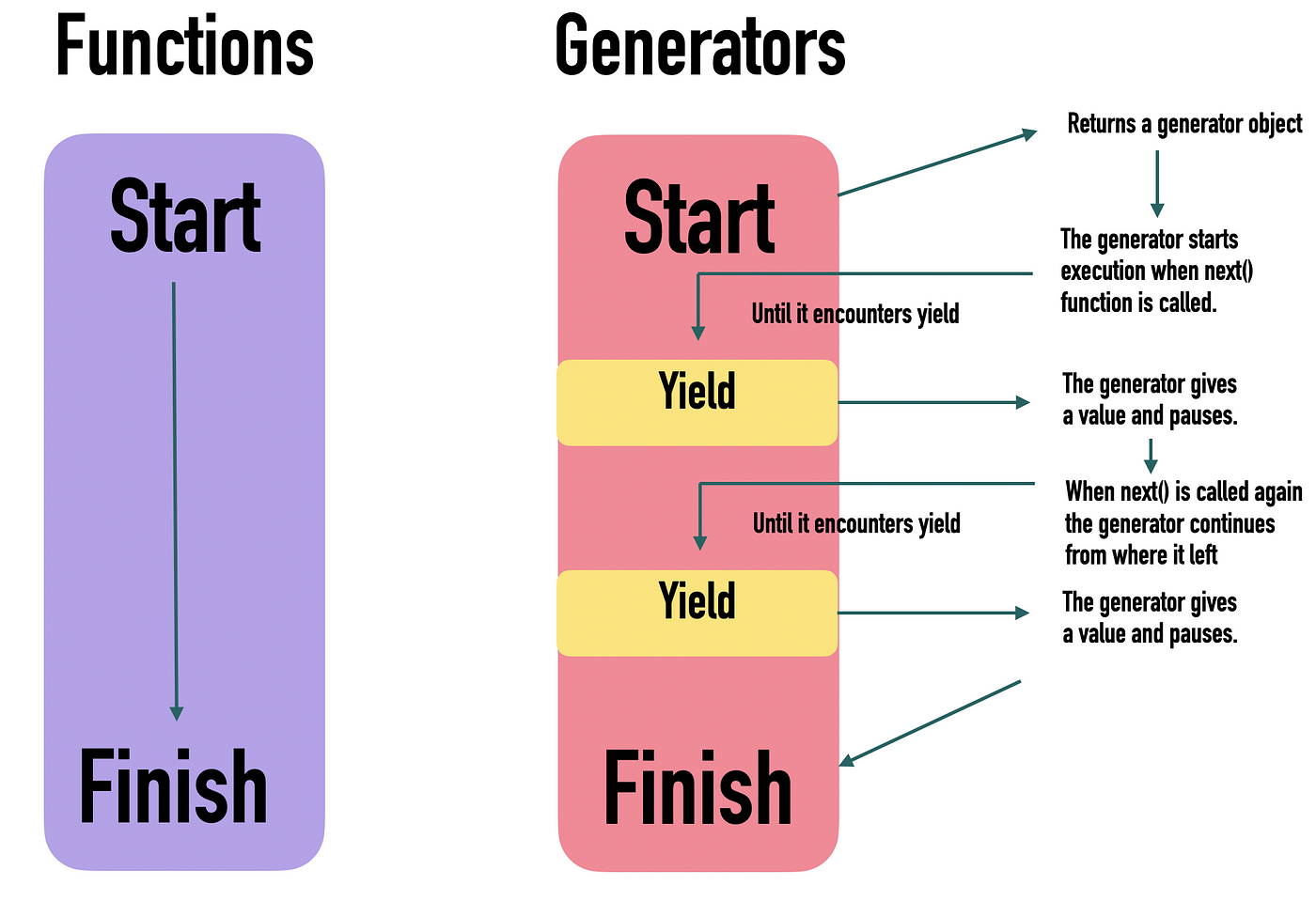
Generators are a special type of function that can pause execution and resume later, allowing you to define an iterative algorithm by writing a single function whose execution is not continuous.
Syntax:
function* generatorFunction() {
  // yield statement
}
Example:
function* countToThree() {
  yield 1;
  yield 2;
  yield 3;
}

const generator = countToThree();

console.log(generator.next()); // { value: 1, done: false }
console.log(generator.next()); // { value: 2, done: false }
console.log(generator.next()); // { value: 3, done: false }
console.log(generator.next()); // { value: undefined, done: true }
Generator Functions
Generator functions use the function* syntax and the yield keyword to produce a sequence of values.
Example:
function* colors() {
  yield 'red';
  yield 'green';
  yield 'blue';
}

const colorGenerator = colors();

console.log(colorGenerator.next()); // { value: 'red', done: false }
console.log(colorGenerator.next()); // { value: 'green', done: false }
console.log(colorGenerator.next()); // { value: 'blue', done: false }
console.log(colorGenerator.next()); // { value: undefined, done: true }
Infinite Generators
Generators can be used to create infinite sequences.
Example:
function* idGenerator() {
  let id = 1;
  while (true) {
    yield id++;
  }
}

const generator = idGenerator();

console.log(generator.next().value); // 1
console.log(generator.next().value); // 2
console.log(generator.next().value); // 3
// And so on...
Generator Delegation
Generators can delegate part of their operation to another generator function using the yield* expression.
Example:
function* generatorA() {
  yield 'A1';
  yield 'A2';
}

function* generatorB() {
  yield 'B1';
  yield* generatorA();
  yield 'B2';
}

const generator = generatorB();

console.log(generator.next()); // { value: 'B1', done: false }
console.log(generator.next()); // { value: 'A1', done: false }
console.log(generator.next()); // { value: 'A2', done: false }
console.log(generator.next()); // { value: 'B2', done: false }
console.log(generator.next()); // { value: undefined, done: true }
Classes
Introduction to Classes
Classes in JavaScript are a blueprint for creating objects with predefined properties and methods. They provide a more convenient and syntactically sugar-coated way to create constructor functions and prototypes.

Syntax:
class ClassName {
  constructor(parameter1, parameter2) {
    this.property1 = parameter1;
    this.property2 = parameter2;
  }

  method1() {
    // method body
  }

  method2() {
    // method body
  }
}
Example:
class Person {
  constructor(name, age) {
    this.name = name;
    this.age = age;
  }

  greet() {
    console.log(`Hello, my name is ${this.name} and I am ${this.age} years old.`);
  }
}

const john = new Person('John', 30);
john.greet(); // Hello, my name is John and I am 30 years old.
Class Inheritance
Classes can inherit from other classes using the extends keyword.
Example:
class Animal {
  constructor(name) {
    this.name = name;
  }

  speak() {
    console.log(`${this.name} makes a sound.`);
  }
}

class Dog extends Animal {
  constructor(name, breed) {
    super(name); // Call the parent class constructor
    this.breed = breed;
  }

  speak() {
    console.log(`${this.name} barks.`);
  }
}

const dog = new Dog('Rex', 'German Shepherd');
dog.speak(); // Rex barks.
Static Methods
Static methods are defined on the class itself, not on instances of the class. They are called on the class itself rather than on instances of the class.
Example:
class MathUtil {
  static add(a, b) {
    return a + b;
  }

  static subtract(a, b) {
    return a - b;
  }
}

console.log(MathUtil.add(5, 3)); // 8
console.log(MathUtil.subtract(5, 3)); // 2
Getters and Setters
Getters and setters allow you to define methods that get and set the value of an object’s properties.
Example:
class Rectangle {
  constructor(width, height) {
    this._width = width;
    this._height = height;
  }

  get area() {
    return this._width * this._height;
  }

  set width(value) {
    this._width = value;
  }

  set height(value) {
    this._height = value;
  }
}

const rect = new Rectangle(5, 10);
console.log(rect.area); // 50
rect.width = 7;
rect.height = 14;
console.log(rect.area); // 98
Private Fields
Private fields are declared with a # and can only be accessed within the class they are declared in.
Example:
class Counter {
  #count = 0;

  increment() {
    this.#count++;
    console.log(this.#count);
  }

  decrement() {
    this.#count--;
    console.log(this.#count);
  }
}

const counter = new Counter();
counter.increment(); // 1
counter.increment(); // 2
counter.decrement(); // 1
Modules in JavaScript
Modules allow you to break up your code into separate files, making it easier to manage and maintain. JavaScript has two major module systems: CommonJS and ECMAScript Modules (ESM).
CommonJS
CommonJS is a module system used in Node.js. It uses require to import modules and module.exports or exports to export them.
Example: Exporting in CommonJS:
// math.js
const add = (a, b) => a + b;
const subtract = (a, b) => a - b;

module.exports = { add, subtract };
Example: Importing in CommonJS:
// app.js
const math = require('./math');

console.log(math.add(2, 3)); // 5
console.log(math.subtract(5, 2)); // 3
ECMAScript Modules (ESM)
ECMAScript Modules (ESM) are the standard for JavaScript modules. They use import to bring in modules and export to export them.
Example: Exporting in ESM:
// math.js
export const add = (a, b) => a + b;
export const subtract = (a, b) => a - b;
Example: Importing in ESM:
// app.js
import { add, subtract } from './math.js';

console.log(add(2, 3)); // 5
console.log(subtract(5, 2)); // 3
Default Exports
You can export a single value as the default export from a module.
Example:
// logger.js
export default function log(message) {
  console.log(message);
}
Example: Importing a default export:
// app.js
import log from './logger

.js';

log('Hello, world!'); // Hello, world!
Named and Default Exports
You can mix named and default exports in a single module.
Example:
// util.js
export const PI = 3.14;
export default function log(message) {
  console.log(message);
}
Example: Importing named and default exports:
// app.js
import log, { PI } from './util.js';

log(`PI is ${PI}`); // PI is 3.14
Conclusion
This comprehensive guide has covered Iterators and Generators, Classes, and Modules in JavaScript (CommonJS and ECMAScript Modules). Understanding these concepts is crucial for writing modern JavaScript applications. By mastering these topics, you'll be well-prepared to create efficient, maintainable, and scalable code.
In the next article, we'll dive into the critical topic of Memory Management in JavaScript. Understanding how memory is allocated, used, and deallocated, as well as mastering garbage collection techniques, will help you write optimized and efficient code. Stay tuned to learn how to ensure your JavaScript applications use memory effectively and avoid common pitfalls.
About the author
As a passionate Software Developer, I thrive on crafting dynamic and user-centric applications. With a strong foundation in full-stack development, I'm dedicated to delivering top-notch experiences through robust code and innovative solutions.
Comments
Join the discussionNo comments yet. Be the first to comment.
Mastering JavaScript: A Comprehensive Guide
Embark on a journey from novice to ninja in JavaScript. This series follows roadmap.sh's JavaScript guide, offering a structured path to mastering the language. Dive deep into fundamentals, advanced concepts, and best practices.