Mastering JavaScript: Control Flow

Control flow in JavaScript dictates the order in which statements are executed. It allows for decision-making and handling exceptional situations effectively. This guide will delve into conditional statements and exception handling, ensuring you have a comprehensive understanding of these concepts.
Conditional Statements
Conditional statements execute different code blocks based on certain conditions. The two primary conditional statements in JavaScript are if...else and switch.
If...else
The if...else statement is used to perform actions based on a boolean condition.
Syntax:
if (condition) {
    // block of code to be executed if the condition is true
} else if (anotherCondition) {
    // block of code to be executed if anotherCondition is true
} else {
    // block of code to be executed if all conditions are false
}
Example:
let age = 18;

if (age < 13) {
    console.log("You're a child.");
} else if (age < 20) {
    console.log("You're a teenager.");
} else {
    console.log("You're an adult.");
}
Nested if...else:
let score = 85;

if (score >= 90) {
    console.log("Grade: A");
} else {
    if (score >= 80) {
        console.log("Grade: B");
    } else {
        console.log("Grade: C or below");
    }
}

Switch
The switch statement evaluates an expression and executes the matching case block.
Syntax:
switch(expression) {
    case value1:
        // block of code to be executed if expression === value1
        break;
    case value2:
        // block of code to be executed if expression === value2
        break;
    default:
        // block of code to be executed if expression doesn't match any case
}
Example:
let day = 3;
let dayName;

switch (day) {
    case 1:
        dayName = "Monday";
        break;
    case 2:
        dayName = "Tuesday";
        break;
    case 3:
        dayName = "Wednesday";
        break;
    default:
        dayName = "Invalid day";
}

console.log(dayName); // Output: Wednesday
Exception Handling
Exception handling in JavaScript allows you to manage errors gracefully. The main tools are the throw statement, and the try...catch...finally block.

throw statement
The throw statement lets you create a custom error.
Syntax:
throw expression;
Example:
function divide(a, b) {
    if (b === 0) {
        throw new Error("Division by zero is not allowed.");
    }
    return a / b;
}

try {
    console.log(divide(10, 0));
} catch (error) {
    console.error(error.message); // Output: Division by zero is not allowed.
}
try...catch...finally
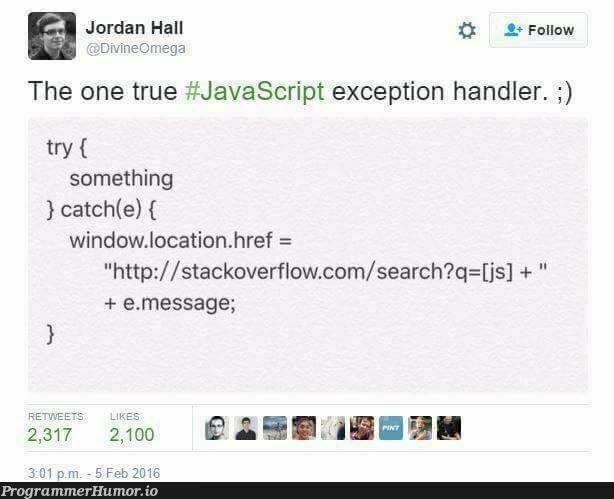
The try...catch...finally block handles exceptions that may occur in the try block.
Syntax:
try {
    // code that may throw an error
} catch (error) {
    // code to handle the error
} finally {
    // code to be executed regardless of an error
}
Example:
try {
    let result = divide(10, 0);
    console.log(result);
} catch (error) {
    console.error(error.message);
} finally {
    console.log("Operation complete."); // Output: Operation complete.
}
Utilizing Error Objects
Error objects provide additional information about the error.
Example:
try {
    throw new Error("Something went wrong!");
} catch (error) {
    console.error("Name: " + error.name); // Output: Name: Error
    console.error("Message: " + error.message); // Output: Message: Something went wrong!
    console.error("Stack: " + error.stack); // Output: Stack trace
}
Custom Error Types:
class CustomError extends Error {
    constructor(message) {
        super(message);
        this.name = "CustomError";
    }
}

try {
    throw new CustomError("This is a custom error.");
} catch (error) {
    console.error(error.name); // Output: CustomError
    console.error(error.message); // Output: This is a custom error.
}
Conclusion
Understanding control flow through conditional statements and exception handling is fundamental for writing robust JavaScript applications. The if...else and switch statements allow for flexible decision-making, while throw, try...catch...finally, and error objects enable effective error management. Mastery of these concepts ensures your code can handle different scenarios and potential issues gracefully.
Next, we will delve into a crucial aspect of JavaScript programming: expressions and operators. These constructs are the building blocks of all operations in JavaScript, from simple assignments to complex logical decisions. Stay tuned as we explore how to effectively utilize them to enhance your coding capabilities.
About the author
As a passionate Software Developer, I thrive on crafting dynamic and user-centric applications. With a strong foundation in full-stack development, I'm dedicated to delivering top-notch experiences through robust code and innovative solutions.
Comments
Join the discussionNo comments yet. Be the first to comment.
Mastering JavaScript: A Comprehensive Guide
Embark on a journey from novice to ninja in JavaScript. This series follows roadmap.sh's JavaScript guide, offering a structured path to mastering the language. Dive deep into fundamentals, advanced concepts, and best practices.